
Shoppers used to type a few words into a search box and scroll through a page of results.
More and more, they ask a question instead. "What's a good carry-on bag under $150 that fits a laptop?" An AI assistant answers with three or four products, and the shopper picks one.
If your product is one of those three or four, you win the sale. If it isn't, the shopper may never see you.
This guide explains how the main AI shopping assistants choose products, and what you can do to be included. It applies whether you sell on your own store, on Shopify, on Etsy, or on Amazon.
One caveat before we start. This area changes quickly. Everything here was checked against each company's own documentation in October 2026, and we link to those sources so you can confirm the current details.
Quick answer: how do you get recommended by AI shopping assistants?
Give the assistants complete, accurate product data, and make sure they can read it. In practice that means clear titles and descriptions, correct prices and stock levels, real reviews, product feeds submitted to Google and Microsoft, and a website that doesn't block AI crawlers. You cannot buy a place in the organic product results on ChatGPT or Perplexity.
Key takeaways
- AI assistants recommend products they can understand. Missing or vague product data is the most common reason a product is left out.
- Product results in ChatGPT and Perplexity are not paid placements.
- Shopify and Etsy sellers are already connected to ChatGPT. Everyone else should focus on product feeds and crawler access.
- Most AI shopping features are US-first today.
- The same work also improves your normal search results and your conversion rate, so none of it is wasted.
How AI shopping assistants choose products
The assistants differ in the details, but they follow the same basic steps.
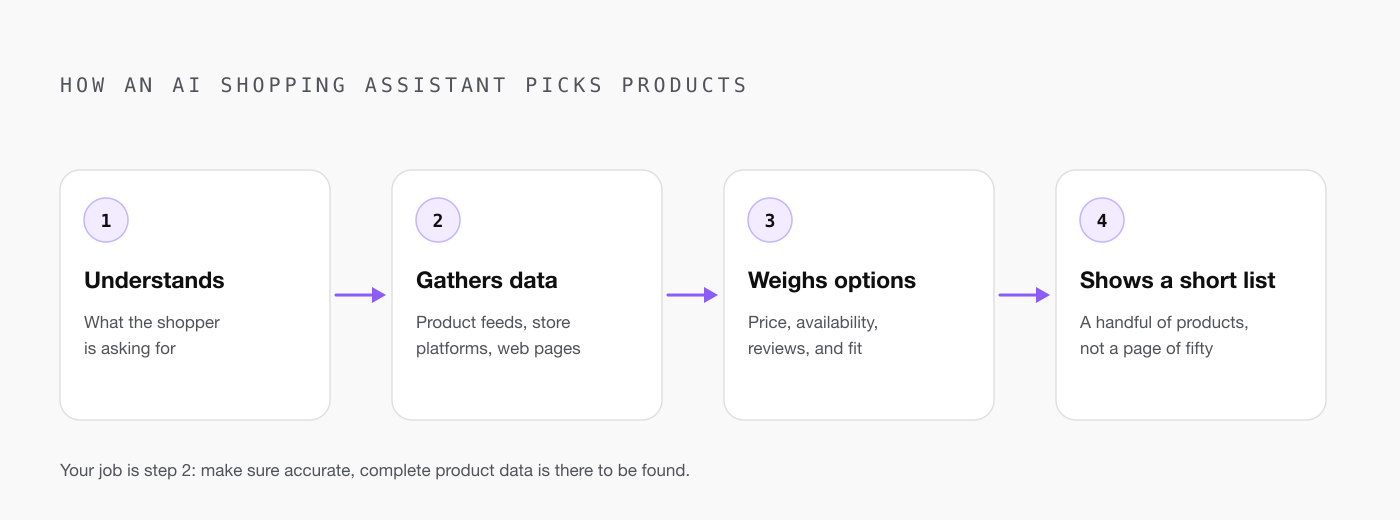
1. They work out what the shopper wants. The assistant reads the question and any context it has. OpenAI's help page gives an example: if a shopper sets a budget of $30, ChatGPT focuses more on price.
2. They pull product data. This comes from product feeds, from platforms like Shopify, and from reading web pages. OpenAI describes it as "structured metadata from first-party and third-party providers", such as price and product description, plus other third-party content.
3. They weigh the options. OpenAI says merchants are ranked "based on factors like availability, price, quality, and whether they are the maker or primary seller of that item." Reviews matter too. ChatGPT shows review summaries built from public websites.
4. They show a short list. Usually a handful of products, not a page of fifty. That is why being included matters so much more than it did in traditional search.
No company publishes its exact formula. OpenAI's own feed documentation notes that being eligible does not guarantee your product is shown.
Where each assistant gets its product data
| Assistant | Where product data comes from | How to get included |
|---|---|---|
| ChatGPT | Shopify Catalog, Etsy, merchant product feeds, and web pages | Shopify and Etsy sellers are already integrated. Others can apply to share a product feed. |
| Google AI Mode and Gemini | Google Merchant Center | Keep a complete Merchant Center feed. Checkout is rolling out to eligible US retailers. |
| Microsoft Copilot | Microsoft Merchant Center feeds and web information | Submit a Microsoft Merchant Center feed. Shopify merchants are enrolled automatically. |
| Perplexity | Platform integrations including Shopify, plus its Merchant Program | Shopify sellers are covered by the integration. Large retailers can join the free Merchant Program. |
| Alexa for Shopping (formerly Rufus) | Amazon listings, customer reviews, and community Q&As | Applies to Amazon listings only. Improve the listing itself. |
A few details worth knowing:
ChatGPT. OpenAI's merchant page says that if you sell through Shopify or Etsy, your catalog is already integrated and no extra setup is needed. Shopping is live for ChatGPT users in the US. Shoppers are sent to your site or app to buy by default, with no fees for purchases made there.
Google. In January 2026 Google announced the Universal Commerce Protocol, an open standard built with Shopify, Etsy, Wayfair, Target, and Walmart. It lets shoppers check out inside AI Mode and the Gemini app with eligible US retailers. Google says retailers remain the seller of record.
Microsoft Copilot. Copilot Checkout began rolling out in the US in January 2026. Microsoft says the merchant owns the transaction, the customer data, and the relationship. Microsoft also reports that shopping journeys that included Copilot led to 53% more purchases within 30 minutes than those without it. That is Microsoft's own figure, so treat it as a company claim.
Perplexity. Perplexity says its product cards "aren't sponsored" and are "unbiased recommendations". Its Merchant Program is free and aimed at large retailers.
Amazon. Amazon's assistant was called Rufus until May 13, 2026, when it was renamed Alexa for Shopping. Amazon says it is trained on the product catalog, customer reviews, community Q&As, and information from across the web. We cover Amazon in detail in our guide to optimizing listings for Amazon's AI assistant.
The checklist: nine things to do
You don't need a developer for most of this. Work through it in order.
1. Complete your product data
OpenAI's product feed specification is a useful guide to what assistants want, even if you never send OpenAI a feed. The required fields are a product ID, title, description, price, availability, image, brand, seller name, and product page link.
It also recommends review count and star rating, product identifiers such as GTIN, shipping price, and return policy details.
Check your own catalog against that list. Every blank field is a question the assistant cannot answer about your product.
2. Write descriptions that answer real questions
Shoppers ask assistants things like "is this good for small apartments?" or "will this fit a 15-inch laptop?"
If your description only says "premium quality, great value", the assistant has nothing to work with. Say who the product is for, what it is used for, what it fits, and what it is made of.
Google is moving the same way. Its January announcement added new Merchant Center fields for "answers to common product questions" and "compatible accessories or substitutes".
3. Keep price and stock accurate everywhere
Availability and price are two of the ranking factors OpenAI names. If your feed says a product is in stock at $49 and your site says it is sold out at $59, you lose trust with the assistant and with the shopper.
Update feeds whenever prices or stock change. Daily is a sensible minimum.
4. Earn real reviews and make them visible
Assistants summarize what reviewers say. A product with no reviews gives them nothing to summarize.
Ask every customer for a review, show reviews on the product page, and include review count and rating in your feeds where the platform supports it. Never buy or invent reviews. It breaks platform rules, and assistants compare what many sources say.
5. Make sure AI crawlers can read your site
This one catches people out. It caught us.
OpenAI recommends allowing its OAI-SearchBot crawler in your robots.txt file so your site can appear in ChatGPT's search results. But robots.txt is only half of it.
When we checked our own website, the robots.txt file was fine, yet our hosting provider's firewall had a setting switched on that blocked known AI bots. Nothing on the site suggested a problem.
Check both places: your robots.txt file, and any bot-blocking setting in your hosting, firewall, or security service.
6. Add structured data to product pages
Structured data is a small block of code that labels your page for machines: this is the product name, this is the price, this is the rating. The standard format is schema.org's Product markup.
Many e-commerce platforms and themes add it automatically. Paste a product page into Google's Rich Results Test to confirm yours is there and has no errors.
7. Publish clear shipping and return policies
Feeds ask for shipping cost and return terms because shoppers ask about them. "Does it ship free?" and "Can I return it?" are common questions.
Put both policies on your site in plain language, and fill in the matching feed fields.
8. Submit your product feeds
If you run your own store and are not on Shopify:
- Set up Google Merchant Center and submit your catalog. This covers Google's AI Mode and Gemini.
- Set up Microsoft Merchant Center. Microsoft says its feeds help inform organic Copilot results.
- Apply to share a feed with OpenAI through its merchant page. OpenAI says a self-serve platform is planned.
If you are on Shopify, check Sales channels in your admin. Shopify says its agentic storefronts send your products to the major AI channels with no apps to install.
9. Measure what comes back
Open your analytics and look at referral traffic. Visits from chatgpt.com, perplexity.ai, copilot.microsoft.com, and gemini.google.com tell you whether assistants are sending shoppers your way.
It will be a small number at first. Watch the trend, and note which products get picked.
What you cannot control
It helps to be clear about the limits.
You cannot pay for a spot in ChatGPT's or Perplexity's product results. Both companies say those results are not ads.
You cannot see a ranking report. There is no dashboard that says "you are number four for carry-on bags".
And you cannot force an assistant to describe your product a certain way. ChatGPT may rewrite your title and add labels like "Budget-friendly" based on what reviewers say.
What you can control is the raw material. Clear data, honest reviews, accurate prices, and open access. Anyone promising guaranteed AI rankings is guessing.
A final word
AI shopping is early, and it is mostly US-only for now. But the direction is clear, and the sellers who prepare their product data today will be the ones assistants can recommend tomorrow.
The good news is that this is not a new kind of marketing trick. It is the basics done properly: describe your product clearly, keep your information accurate, and earn real reviews.
If you sell on Amazon and want a second pair of eyes on how your listings read to shoppers and to AI, book a free audit and we'll walk you through what we'd change.
Frequently asked questions
Can I pay to have my products recommended in ChatGPT?
Not in the product results. OpenAI states that product results are selected independently by ChatGPT and are not ads, nor influenced by any OpenAI partnerships. Ads exist in ChatGPT but are separate from product results. Perplexity says the same about its product cards. What you can influence is the quality and completeness of your product data.
Do I need Shopify to appear in AI shopping assistants?
No, but Shopify makes it easier. OpenAI says catalogs from Shopify and Etsy sellers are already integrated into ChatGPT with no extra setup. Sellers on other platforms can submit product feeds to Google Merchant Center and Microsoft Merchant Center, and can apply to share a feed directly with OpenAI.
How do AI shopping assistants decide which products to show?
They match the shopper's request against product data such as titles, descriptions, price, and availability, then weigh other signals like reviews. OpenAI says ChatGPT ranks merchants on factors like availability, price, quality, and whether they are the maker or primary seller of the item. None of the assistants publish an exact formula.
Is AI shopping only available in the United States?
Mostly, for now. OpenAI says shopping is live for ChatGPT users in the US. Google's checkout in AI Mode and Gemini and Microsoft's Copilot Checkout both launched with eligible US merchants first. All three say they plan to expand, so it is worth preparing your product data now even if you sell elsewhere.