
You have the product, the packaging, and a launch date. The harder question is what to do once the listing goes live and the first advertising bill arrives.
A useful Amazon launch plan gives you an order of work: prepare the offer, bring in relevant traffic, find what stops people buying, then decide where more spending makes sense. It also tells you when to stop and fix something.
This guide is for US brands launching a new ASIN, Amazon's product identifier. It assumes the product has already been developed. First-time Amazon sellers can follow the same sequence, with extra time for account setup, category requirements, and fulfillment preparation.
The short answer: finish the buying experience before paying for traffic. Use days 1–14 to check the launch, days 15–30 to understand early demand, days 31–60 to improve the offer, and days 61–90 to decide what deserves more investment. The clock starts when customers can actually buy the product.
The schedule below is our suggested working plan, not an Amazon rule. A low-volume product may need longer to collect useful evidence. Ninety days is a review point, not a promise of profitability.
Your 90-day Amazon launch roadmap
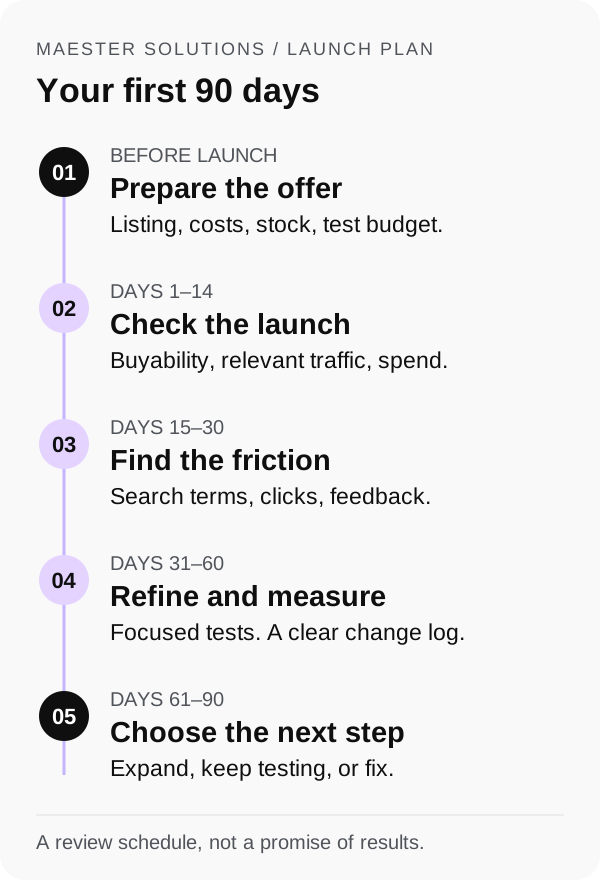
| Stage | Main job | What you should have by the review |
|---|---|---|
| Before launch | Prepare the offer and buying experience | A buyable listing, checked costs, and a written test budget |
| Days 1–14 | Catch problems and attract relevant shoppers | A record of availability, traffic, spend, and initial orders |
| Days 15–30 | Find where shoppers drop off | A short list of listing and targeting changes, with reasons |
| Days 31–60 | Test and refine | A comparison of what changed and what happened afterward |
| Days 61–90 | Decide the next investment | A decision to expand, keep testing, or pause and fix |
Before launch: make the offer worth a click
Give shoppers a clear reason to choose you
Pick a few genuinely comparable products. Match the use case, size, material, quantity, and price range before calling something a competitor.
Read what customers praise and what disappoints them. A repeated complaint about a lid leaking is more useful than a vague instruction to make your listing "premium." If your product solves that problem, show how. If it does not, do not imply that it does.
Write a single sentence explaining who the product is for and why they would choose it. Use that sentence to guide the images, title, and bullets.
Amazon's Product Opportunity Explorer can help you investigate demand, search terms, reviews, and returns within a niche. Treat that information as evidence to evaluate, not confirmation that a launch will work.
Check the economics before setting bids
List the costs behind a sale: product cost, inbound freight, Amazon referral and fulfillment fees, discounts, and a reasonable allowance for returns and other variable costs. Separate these from fixed overhead and one-time launch expenses.
Here is a simplified example, not a client result or category benchmark:
| Per-unit calculation | Illustrative amount |
|---|---|
| Selling price | $30 |
| Product, fulfillment, fees, and other variable costs before ads | $21 |
| Contribution available before advertising | $9 |
| Contribution margin before advertising | 30% |
For an ad-attributed sale of this same product at that price, spending $9 on advertising uses the whole contribution. That is a 30% contribution break-even ACoS. It does not cover fixed overhead or recover the launch investment, so the target for an ongoing profitable sale needs room below it.
Amazon's ACoS guide explains the relationship between advertising cost and margin. Your own costs matter more than someone else's "good ACoS."
You may choose to spend above break-even while learning. Put a dollar limit and a review date on that decision before the campaign starts.
Finish the listing and confirm it is buyable
Check the page on a phone as well as a desktop. Can a shopper quickly tell what is included, how large it is, what it fits, and whether it solves their problem?
- Use an accurate main image that meets the applicable Amazon image requirements.
- Give supporting images a job: explain dimensions, show use, answer an objection, or clarify the contents of the package.
- Write a readable title, useful bullets, and complete product attributes. Keep claims consistent with the actual product.
- Add A+ Content if eligible, but prioritize a complete, accurate buying experience first.
- Check the price, stock availability, delivery promise, variation selection, and buying options on the live page.
If this is your first launch, allow time for seller verification, required product documentation, identifiers, and category approvals. Follow Amazon's seller registration guidance and the requirements shown for your product. Inventory being sent to a fulfillment center is not the same as inventory being available for customers to buy.
Before spending: name the person responsible for listing issues, advertising changes, customer feedback, and stock decisions. Small launches still need clear ownership.
Days 1–14: check the launch and control the spend
The first task is to confirm that the offer works. Check for listing problems, unavailable stock, unexpected delivery dates, or the wrong variation appearing in ads. Fix those before treating low sales as a marketing problem.
Start with a manageable advertising test
Choose a small set of relevant targets you can review properly. A practical starting structure might include automatic targeting for discovery, a manual campaign for specific relevant keywords, and selected product targets where appropriate. The mix depends on the product and budget; it is not a required recipe.
Amazon's new-ASIN advertising guide is a useful reference for available options. You do not need every ad format on day one.
Use the budget to answer a question. For example: "Can this offer convert shoppers looking for this specific use case?" That is easier to act on than "Let's spend and see."
Illustrative planning calculation: 200 clicks at an estimated $1.20 per click would cost $240. This is arithmetic, not a recommended minimum or a prediction of your CPC. Actual click prices and the evidence needed will vary. Set an amount your business can afford to test, then monitor it.
Check daily, make considered changes
Check availability, spend, and obvious targeting errors daily. Save a fuller review for a regular weekly slot. Allow advertising reports time to update before judging recent clicks, and compare like-for-like reporting periods.
Do not redesign the page, cut the price, and rewrite every campaign after two disappointing days. You will struggle to work out which change mattered. Equally, there is no reason to keep paying for clearly irrelevant traffic just to complete a scheduled test.
By day 14: aim to know whether the offer is functioning, whether ads are reaching relevant searches, and how much the test has cost. A few orders are an early signal, not proof that the product is ready to scale.
Days 15–30: find where shoppers lose interest
Review the journey in order: people seeing the offer, clicking through, buying, and keeping the product. Use the same period and ASIN scope when comparing results.
Amazon's Sponsored Products search term report helps identify searches associated with ad clicks and supports decisions about targeting and negatives. For eligible brands, Search Query Performance adds a view of impressions, clicks, cart adds, and purchases for search queries.
Write down the three most useful findings. For example:
- A search term gets clicks but describes a use the product does not support. Exclude or reduce that traffic.
- The product's dimensions are buried in the copy. Make them clear in a supporting image.
- A closely related search converts within the cost target across repeated orders. Investigate it further before increasing its budget.
For deeper troubleshooting, use our guides to Amazon traffic that does not convert and reducing ACoS.
Plan for honest customer feedback
Check whether Amazon Vine fits the product and your account. Eligibility includes account and product conditions, eligible FBA offers, and fewer than 30 reviews. Branded products require Brand Registry; confirm the current rules and fees before enrolling. Amazon also allows eligible pre-launch enrollment for a customer-ready FBA listing with a future launch date.
Vine reviewers provide their own opinions. Enrollment does not guarantee positive reviews or a particular sales result. Budget for the units and applicable costs.
Use Amazon's permitted review-request methods. Never offer a discount or refund in exchange for a review, and do not filter requests so only happy customers are asked. Product feedback should help you find problems as well as build confidence.
By day 30: choose a small number of changes, assign an owner to each, and record why you made them. If traffic is still too low to draw a conclusion, say so rather than forcing a success or failure label.
Days 31–60: improve the offer and measure the change
Work on the biggest problem your evidence supports. That might be a confusing image, weak keyword relevance, a price that does not make sense beside competing offers, or a product issue raised by customers.
Keep a change log with four columns: date, change, reason, and review date. Also note promotions, stock problems, and other events that could affect the comparison. A better week after an edit does not automatically prove the edit caused it.
If eligible, Manage Your Experiments lets you compare versions of content such as images, titles, and A+ Content. It requires an eligible brand role and enough recent traffic for the ASIN. A new product may not qualify yet. Follow the experiment's duration rather than declaring a winner from early fluctuations.
An ordinary before-and-after comparison can still inform your decisions, but be clear about its limits. If you changed the price and ran a promotion at the same time, you have not isolated the effect of the new image.
Keep one weekly tracking sheet
Use this as a blank template. Record actual figures from your reports, not targets borrowed from another category.
| What to record | What it helps you decide |
|---|---|
| Availability and notable listing issues | Whether sales were limited by the offer being unavailable or incorrect |
| Sessions, units ordered, and Unit Session Percentage | Whether traffic and purchasing behavior changed; this percentage is units divided by sessions, not ad conversion rate |
| Ad spend, clicks, orders, and attributed sales | Which traffic is costing money and producing orders |
| ACoS and contribution after advertising | Whether the sales fit the economics of the product |
| Total sales and ad spend as a share of total sales | Whether the overall business is keeping pace with advertising investment |
| Return reasons and review themes | Whether expectations, the listing, or the product need attention |
| Changes made and the next review date | What you will evaluate next and when |
Keep the definition and report source consistent each week. Advertising and retail sales reports can use different attribution rules and timing. Simply subtracting one report from another is not a precise measure of organic sales, and attributed sales do not prove the ads caused every purchase.
By day 60: you should have a clearer explanation of what is helping or holding back the product, even if the correct next step is to keep testing.
When the launch stalls: what to check next
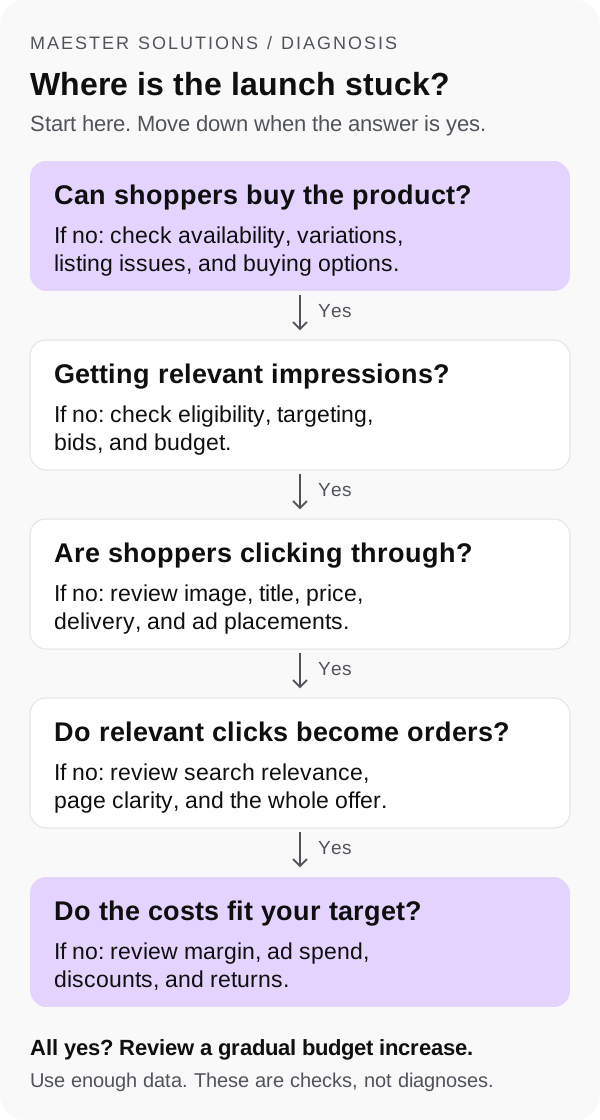
Work through the diagram from the top. The first broken step is the place to investigate, not a guaranteed diagnosis.
Few relevant impressions: check ad eligibility, targeting, budget, bids, and product relevance. Confirm the listing is available and not search-suppressed. Our suppressed-listing checklist covers that separate issue.
Impressions but few clicks: compare the main image, title, visible price, delivery promise, and review context with relevant competing offers. Also check where the ads appear. Low click-through rate alone does not identify the cause.
Clicks but few orders: review search relevance and whether the page answers the questions a shopper needs answered before buying. Look at the offer as a whole, including price and delivery.
Orders but little contribution: revisit the unit economics, ad costs, discounts, and returns. Higher revenue can hide a product that is becoming more expensive to sell.
If the issue later becomes a loss of search visibility, use our organic-rank diagnostic guide rather than assuming every slowdown needs a higher ad budget.
Days 61–90: decide what deserves more investment
At this stage, write a decision rather than simply carrying the launch budget forward.
Expand selectively when relevant traffic converts across enough orders to be useful, costs fit your agreed target, and inventory can support more demand. Increase investment in measured steps and set the next review date.
Continue a focused test when there is a plausible opportunity but not enough evidence. State exactly what you are testing, what it can cost, and what would change your mind.
Pause and fix when a product defect, persistent misunderstanding, poor economics, or unavailable stock makes extra traffic unhelpful. A launch plan should make it easier to stop a costly mistake.
For an existing brand, also check the wider catalog. Did the new ASIN add useful sales, or mainly move orders away from an existing product? Account-level revenue and contribution provide context that the new listing's sales alone cannot.
At day 90: document the decision, the evidence behind it, who owns the next steps, and the next budget limit. That is a useful launch outcome even when the answer is to change the offer.
A checklist for your next launch meeting
- Can a shopper buy the correct product at the intended price and delivery promise?
- Is the reason to choose it obvious in the listing?
- Have we calculated contribution before ads and agreed the test budget?
- Does each campaign have a purpose we can evaluate?
- Are we comparing consistent reports and allowing time for reporting updates?
- Have we reviewed customer feedback, not just revenue?
- Do we know what changed, when, and why?
- Have we chosen to expand, test further, or fix a specific problem?
Avoid the expensive shortcuts: changing everything at once, using a universal ACoS target, treating a few orders as proof, or relying on a supposed fixed "honeymoon period" to carry the launch. The schedule is there to make decisions easier. It cannot replace an offer customers want.
Frequently asked questions
How long does it take to launch a new product on Amazon?
Preparation depends on your product, approvals, creative assets, and inventory readiness. This plan starts its 90-day clock when the offer is live and customers can buy it. Use the first 90 days to learn and make decisions, not as a guaranteed deadline for profitability.
How much should I budget for an Amazon product launch?
Separate product and inventory costs, listing creative, Amazon fees, promotions, and advertising. Set an advertising test budget using your margins, an estimated cost per click, and the number of clicks you can afford to learn from. There is no single launch budget that fits every category.
Can I launch an Amazon product without reviews?
Yes, but shoppers have less evidence to judge a new product. Clear images, accurate specifications, and a credible offer become especially important. Check whether the product qualifies for Amazon Vine, and use Amazon's permitted review-request methods. Never offer rewards for reviews or ask only satisfied buyers to leave them.
When should I increase my Amazon PPC budget?
Consider an increase when relevant traffic converts across more than a handful of orders, costs fit your agreed target, reporting has had time to update, and stock can support more sales. A campaign spending its daily budget is not, by itself, a reason to give it more.
Do I need Brand Registry before launching on Amazon?
Brand Registry is not a blanket requirement for selling on Amazon, although product and category requirements still apply. It gives eligible brands access to additional protection and tools. Check the separate eligibility rules for A+ Content, Vine, Brand Analytics, and Manage Your Experiments before including them in your launch plan. Amazon's Brand Registry overview explains the program.
Need a second pair of eyes on your launch?
Maester Solutions helps with listing content, Seller Central account work, and PPC. If you are preparing a new ASIN or trying to understand a slow start, book a free 15-minute discovery call. We will discuss the product, what you have tried, and the information needed for an audit. You can also send us a message if you prefer to write.
Written by Hamid Raza, founder of Maester Solutions. Amazon tool guidance checked in October 2026. The timeline and examples are planning guidance; eligibility and program terms should be checked in your account before use.