
You have a product that needs a better Amazon listing, a limited creative budget, and two possible projects: new listing images or A+ Content. Which deserves the money first?
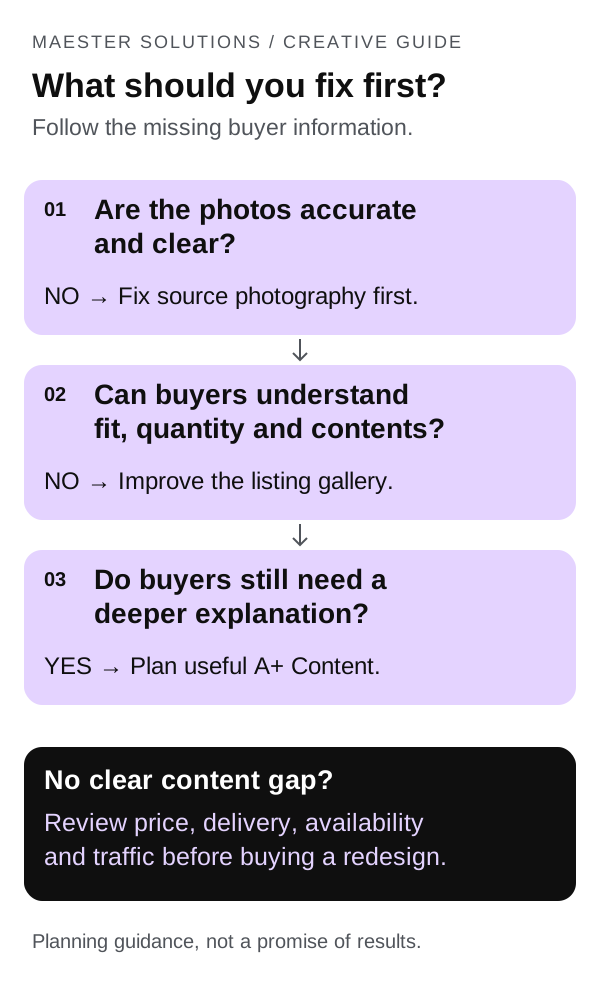
Start with the information shoppers are missing. If they cannot tell what they will receive, whether it fits or how it works, fix the relevant listing images first. If the gallery already explains the essentials but the product needs a deeper demonstration or comparison, A+ Content may be the better next project.
That is our planning recommendation, not a claim that one format always produces a higher return. A new design cannot fix every reason a product fails to sell.
Maester Solutions provides Amazon listing image design and A+ Content, so we have a commercial interest in this decision. This guide is intended to help you define the work before paying us or another provider to do it.
Understand what you are buying
Listing images and A+ Content share source material, but they have different jobs.
The main image identifies the product in search and on its detail page. Supporting gallery images can explain details such as dimensions, included parts and use. Follow Amazon's product image requirements and your category guidance. The main image has stricter rules than supporting images; do not turn it into a promotional infographic.
A+ Content adds structured content to the detail page. Basic A+ offers text, images and comparison charts. Premium A+ adds formats such as video, interactive hotspots and carousels. The right choice depends on what you need to explain and which features your account can use. See Amazon's overview of A+ Content.
Photography is a separate question. If your only product photo is blurry, the wrong color or missing an important angle, a layout redesign may still leave you without usable source material. Ask whether you need new photography before comparing design packages.
Use this decision table before requesting a quote
These are starting points for a review, not diagnoses based on sales numbers alone.
| What you find | First project to consider | What the brief should solve |
|---|---|---|
| The product is hard to identify at thumbnail size | Main-image review and better source photography if needed | Show the actual product clearly within category rules |
| Shoppers cannot understand size, fit, quantity or included parts | Supporting listing images | Answer the missing purchase questions visibly |
| Images look polished but contain tiny text or vague slogans | Gallery redesign | Replace decoration with readable, specific information |
| The gallery explains the basics, but setup or use needs a sequence | A+ Content | Walk through the process without cramming it into one image |
| Buyers need help choosing among your own models | Gallery clarification plus an A+ comparison where useful | Explain the meaningful differences without hiding essential fit information |
| The page is clear, but sales are weak | Diagnose the offer and traffic before buying more creative | Check price, delivery, availability, reviews and search relevance |
For example, low click-through can justify reviewing the main image, but it does not prove the image is the cause. The search term, price, ratings and delivery offer may also influence the decision. Likewise, low conversion alone does not tell you to buy A+ Content. Our guide to Amazon traffic that is not converting covers the wider review.
Find the missing answers in your current listing
Open your listing on a phone and review it as someone who has never used the product. Write down the answers to five questions:
- What exactly am I buying, including quantity and accessories?
- Will it fit my space, equipment or intended use?
- What makes it suitable for the job I need done?
- What must I know about setup, use or care?
- Which version should I choose, and what is different about it?
Compare those answers with recurring questions in your customer messages, reviews and return feedback. Treat that feedback as a source of questions to investigate, not permission to copy customer wording into promotional claims.
Build a short list in this form: buyer question → verified answer → best place to explain it. If an answer is not verified, resolve the product question before asking a designer to make it persuasive.
Keep essential limitations visible. If an accessory does not fit a particular model, a beautiful lifestyle image is no substitute for clear compatibility information.
Example: a bottle listing with an unclear gallery
Imagine a fictional reusable bottle. Its existing gallery has several attractive outdoor scenes, but no clear view of the lid, dimensions or package contents. A seller could commission an elaborate brand story while leaving those basic questions unanswered.
A more useful first brief would ask for the following assets. This is an illustrative plan, not a client project or an Amazon-required image count.
- Main image: an accurate product view prepared to the applicable main-image rules.
- Size image: verified height and base width, with units and a clear view of how the measurements were taken. Do not claim universal cup-holder compatibility.
- Contents image: the actual bottle and included lid, with no extra accessories implied.
- Use/detail image: a close view of the opening and closure so shoppers can understand the design.
- Care image: verified cleaning instructions and relevant limitations, readable on a phone.
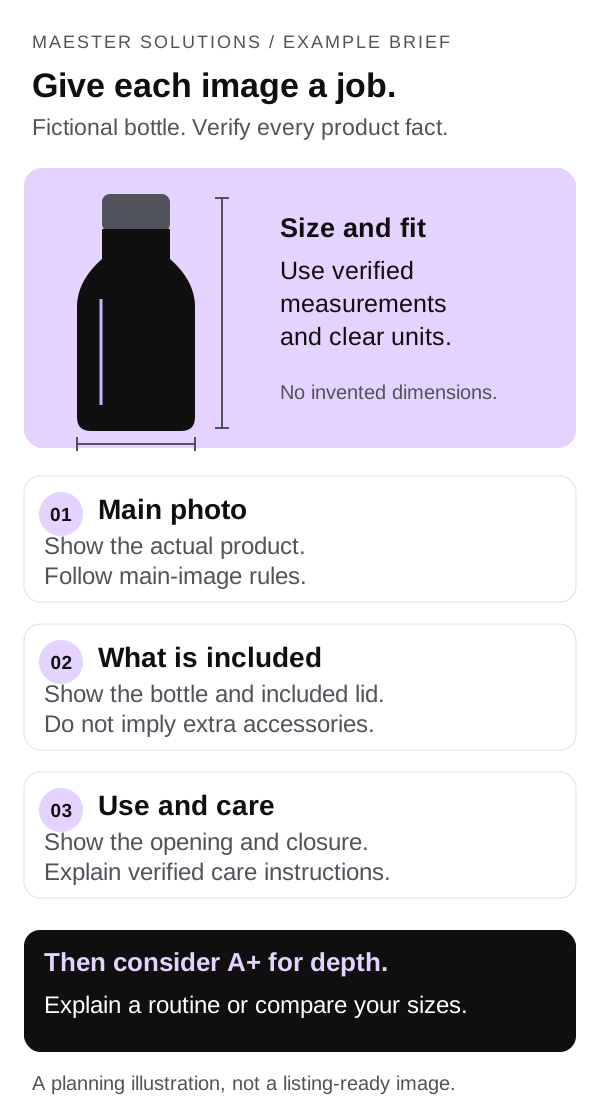
After those gaps are addressed, A+ could explain a care routine or compare the brand's bottle sizes. It should add useful detail rather than repeat the same slogan across several larger panels.
The same reasoning applies to other categories: a shelf needs dimensions and installation details; a replacement part needs compatibility; a multipack needs an unmistakable quantity. The best first project depends on the unanswered question.
When A+ Content should be the next investment
A+ becomes a stronger candidate when your source assets and gallery already work, and you can name what the extra space will accomplish. Examples include a setup sequence, a technical explanation or a comparison of products within your own range.
Do not pay for a package solely because it fills every available module. Ask what each module helps a buyer understand. If two modules repeat the same point, the plan may need editing rather than expansion.
Check access before commissioning the work. Amazon's current A+ overview lists a Professional selling account plus an eligible brand role, or generic products in the catalog, as access routes. Confirm availability for your specific products in A+ Content Manager. Premium has additional eligibility requirements; do not assume a Basic A+ project gives you Premium access.
Choose Premium when its extra formats solve a real communication problem and you have the assets to use them. A video slot without a useful video is not a reason to upgrade. Basic A+ may be sufficient for a straightforward explanation.
Amazon's A+ design guide explains the available formats and content restrictions. For example, plan comparisons around your own range, not competitors, and keep pricing or promotional messages out of A+ Content. Review the current rules before production and submission.
Send the same brief to every designer
Use this outline to make proposals comparable. You can copy it into an email and replace the prompts with your details.
Products and marketplace: ASINs, variations and the Amazon marketplace covered.
Buyer questions: The three most important questions the current page does not answer.
Verified facts: Dimensions, materials, included items, compatibility, care instructions and evidence for any performance claim.
Available assets: Original photos, packaging files, brand guidelines and any video. Identify missing angles or assets.
Requested work: Main image, supporting gallery, Basic A+ or Premium A+. Ask the provider to explain the proposed sequence and scope.
Review and delivery: Who approves product accuracy, when the work is needed, required file formats and who will publish it.
Budget: A total project limit, with additional photography, video or other production listed separately.
Ask the provider to explain the rationale before approving polished designs. A simple content outline can reveal a misunderstanding about the product earlier than a finished set of graphics.
Compare scope, not just image or module counts
One quote may include copywriting and source files; another may cover layout only. A lower price is difficult to evaluate until those differences are visible.
| Ask about | Get this in writing |
|---|---|
| Products and variations | Exact ASINs, sizes, colors and marketplace versions included |
| Deliverables | Number and type of images or modules, including any alternative concepts |
| Production | Who supplies photography, retouching, renders, video and factual copy |
| Revisions | Included rounds, what counts as a new brief and who pays for extra work |
| Files and rights | Final exports, editable files if included, and agreed usage rights |
| Mobile review | How text size, crops and layouts will be checked before approval |
| Publishing | Who uploads, assigns content to ASINs and handles submission feedback |
| Timing and cost | Delivery milestones, dependencies and separately charged items |
For a wider eCommerce business, specify any intended reuse on your own store, email or ads. Confirm the rights and export formats for each channel; do not assume an Amazon design package includes every adaptation.
At Maester, listing image sets and Basic or Premium A+ are available as one-time creative projects. The scope and final quote are agreed before work begins. Our service page includes portfolio examples so you can assess the work as well as the deliverables.
Decide how you will judge the result
Before publishing, save the existing assets and record the change date. Write a specific hypothesis, such as: “A clear dimensions image will help shoppers determine whether this bottle fits their intended space.” That is more useful than “the page will look premium.”
Where available, use Amazon Manage Your Experiments to compare content versions. Amazon requires a Professional account, the appropriate Brand Representative role and an eligible product with sufficient recent traffic. A+ experiments also require published A+ Content. Check the options available for your ASIN before promising a test in a project brief.
For a focused question, test the relevant content change rather than bundling unrelated changes into the same comparison. Review the experiment's results and uncertainty before declaring a winner. An inconclusive result is not proof of improvement.
If you cannot run an experiment, track the relevant listing metrics and customer questions before and after publication, while noting changes in price, advertising, stock, promotions and delivery. Treat that comparison as directional evidence. It cannot isolate the design's effect the way a controlled experiment can.
Avoid accepting a guaranteed conversion lift as the basis for buying creative. The work should have a clear purpose and a sensible evaluation plan, but your product and selling conditions still matter.
Choose the smallest project that answers the important questions
You do not need to commission the whole product page at once. Fix inaccurate source assets, make the purchase essentials clear, then add depth where it helps buyers decide. For a new ASIN, include those priorities in your product launch plan.
If you want help turning the gaps into a brief, send Maester your ASIN and the content you want to improve. We can discuss listing images, A+ Content or a combined project and agree on the deliverables before quoting. A focused project is a reasonable place to start.
Frequently asked questions
Should I improve Amazon listing images or A+ Content first?
Start with listing images when shoppers cannot clearly identify the product, understand its size or see what is included. Prioritize A+ Content when the gallery already answers those basics and buyers need more explanation, usage guidance or comparisons within your range. This is a planning framework, not a guaranteed order of return.
Can A+ Content replace listing images?
No. A+ Content adds information to the product detail page; it does not replace the main image or supporting gallery. Essential purchase information should be clear in the gallery and relevant listing text, even when you also explain it in A+ Content.
Do I need Premium A+ Content?
Only consider Premium A+ when your account is eligible and its additional formats serve a specific buyer need. A useful demonstration or interactive explanation may justify the work. A larger layout alone does not establish that Premium will outperform well-planned Basic A+ Content.
What should an Amazon creative quote include?
Ask for the ASINs and variations covered, image or module count, source-asset requirements, copywriting, revisions, file formats, usage rights, mobile review, delivery timing and publishing responsibilities. Confirm photography, video and additional production costs separately instead of assuming they are included.